iPhone app
ios/ is a native SwiftUI client for the same local desk. It is not a second backend and it keeps no copy of the books: every screen fetches from the Next.js server on your Mac over the local Wi-Fi. The Mac still owns data/managr.db and the journal.
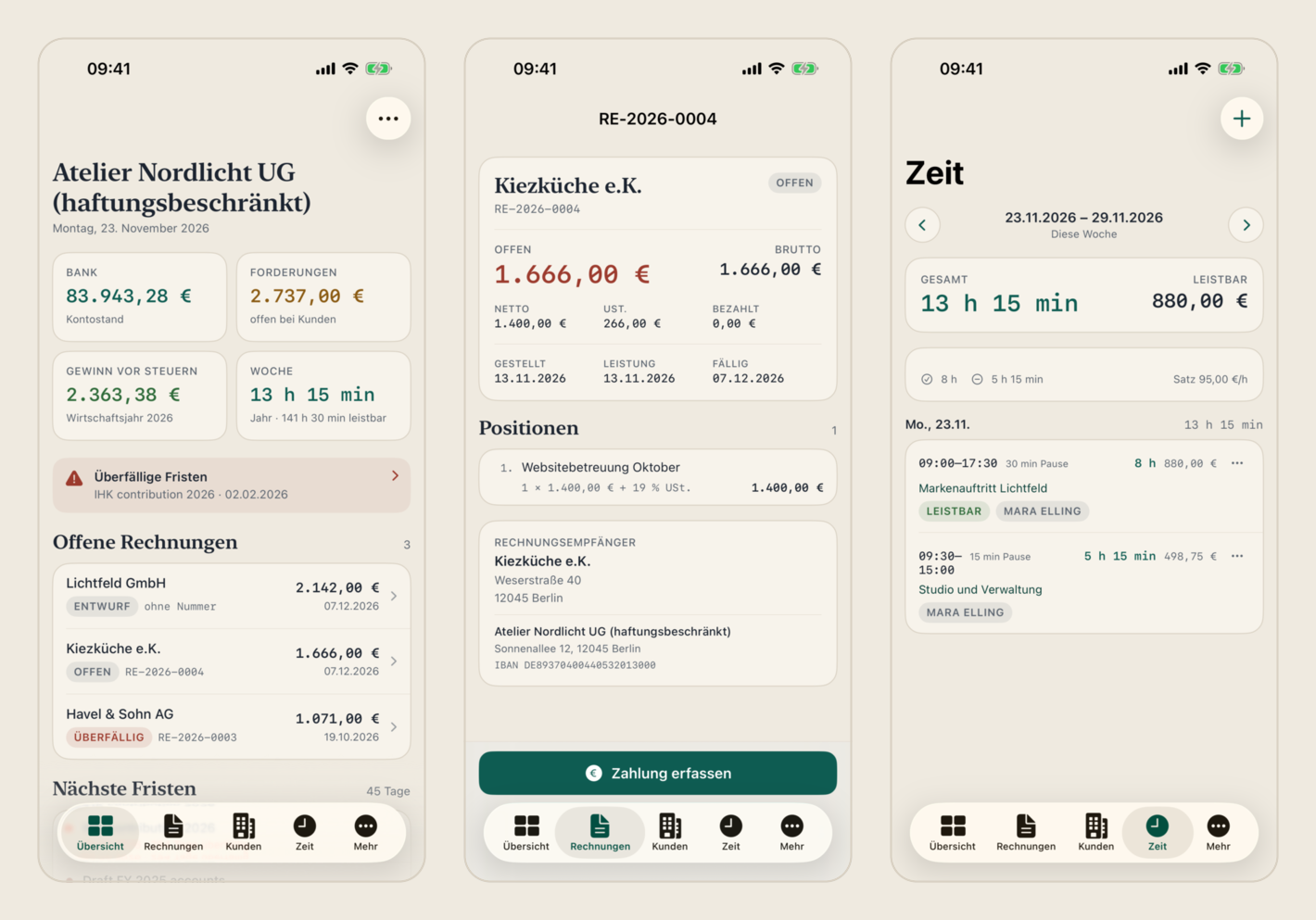
The screenshots use the sample company that is loaded on first launch.
What it covers
- Overview — bank, receivables, profit before tax, open invoices, the next deadlines, open tasks, and the week's time.
- Invoices — list, search, and filter; open an invoice; issue a draft; record a payment against the open amount. The §14 UStG blockers are shown before you issue.
- Customers — list, search, add, and edit; open amount, revenue, time, projects, and that customer's invoices.
- Time — week navigation, totals, entries with activities and working-time warnings; book a new entry; delete an entry (soft delete, restorable on the desk).
- Assistant — chat with the desk's model: streaming answers, the roadmap, every tool call with its arguments and result, and a confirmation card before any write. Pick the provider and model at the top; the last 40 messages stay on the phone. Open it from More → Assistant or the sparkles button on the overview.
- More — people, projects, tasks, deadlines, and settings for the connection, language, and company.
- Company switcher and a German/English interface.
Not in the app: creating an invoice with time-linked positions, editing a draft, documents and uploads, Qonto, tax filings, and the ledger. Use the browser for those.
How it talks to the desk
Reads use the same view JSON as the browser:
GET /api/views/desk
GET /api/views/invoices
GET /api/views/invoice?id=4
GET /api/views/time?week=2026-11-23
Writes use a plain JSON facade over the tool registry:
POST /api/tools
Content-Type: application/json

{ "name": "record_invoice_payment",
  "arguments": { "invoiceId": 4, "amount": "1666,00", "paidOn": "2026-11-23" } }
{ "ok": true, "data": { "amountCents": 166600, "paymentId": 9, "journalEntryId": 130 } }
src/app/api/tools/route.ts calls runTool from src/server/tools.ts, the same registry the MCP endpoint and the in-app assistant use. Validation, domain rules, and journal postings are identical. GET /api/tools lists the tools and their JSON schemas. Next.js server actions are not used because their ids are build artifacts.
The assistant talks to GET /api/assistant, GET /api/assistant/models, POST /api/assistant, and POST /api/assistant/approve. The POST answer is the same NDJSON stream the web panel consumes, so the roadmap, tool steps, and confirmation cards behave identically. Configure the model on the Mac with opencode or MANAGR_AI_MODEL / MANAGR_AI_BASE_URL / MANAGR_AI_API_KEY; the phone only chooses among the models the desk offers.
Run the desk
bun install
bun run dev
Next prints a Network address, for example http://192.168.1.20:3000. Keep the desk running and use that address from the phone; localhost would mean the phone itself. The phone and the Mac must be on the same Wi-Fi.
Build and install
The project is ios/Managr.xcodeproj, generated from ios/project.yml with XcodeGen.
- Open the project in Xcode.
- Select the Managr target → Signing & Capabilities, choose your team, and change the bundle id if needed.
- Connect the iPhone, unlock it, and press Run.
- Trust the developer under Settings → General → VPN & Device Management.
- Open the app, enter the Network address, and allow Local Network access.
A free Apple ID signs for seven days; a paid Apple Developer account signs for a year. The full walkthrough, troubleshooting, and the command-line build are in ios/README.md.
Security
There is no authentication, like the rest of the desk. The views and /api/tools are reachable by anything on the same network, so keep the desk on a trusted Wi-Fi and never expose port 3000 to the internet. Requests use plain HTTP on the local network; the app has an ATS exception for local networking. The app stores the desk address, the language, the last 40 assistant messages, an unsent draft, and the model choice. A remote model endpoint receives the conversation and tool results when one is configured on the Mac; a local model keeps them on the Mac.